Skip to content
JACK & TORQUE

Roundup

Best OBD2 Scanner Apps: Pick the Adapter First

No app can read a network your adapter cannot reach. That is the whole decision, in one sentence.

By Ryder M. · Published October 10, 2026 · Last reviewed October 10, 2026

We earn a commission when you buy through the Amazon links on this page, at no extra cost to you. It never changes which tool we put first, and we publish no price we have not verified. How this site is funded.

Best OBD2 Scanner Apps: Pick the Adapter First — ranked picks with scores and a price check for each
#PickKey capabilityScorePrice
1
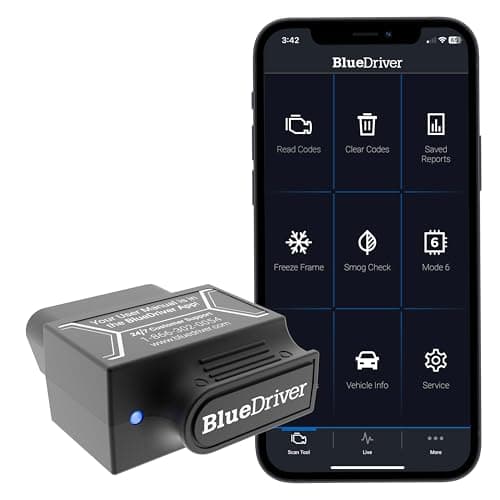
BlueDriver Pro, Amazon product photo
BlueDriver ProThe best app-and-adapter pair for a beginner
Bluetooth to iOS and Android8.8
2
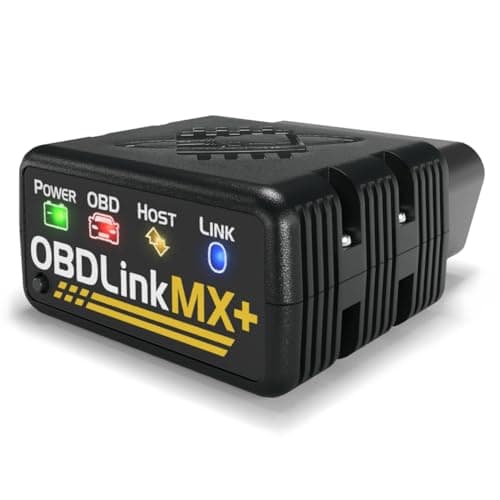
OBDLink MX+, Amazon product photo
OBDLink MX+If you want to choose your own app
All legislated OBD-II, plus Ford MS-CAN and GM SW-CAN8.6
3
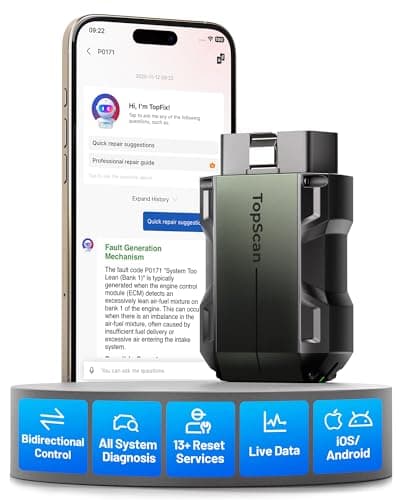
TOPDON TopScan Pro, Amazon product photo
TOPDON TopScan ProApp-driven bi-directional control
Bluetooth to iOS and Android8.6

Product photographs come from each product's own Amazon listing via the Associates program. They are the seller's images, not photographs of anything we own — we have no test rig and claim none.

BlueDriver Pro, Amazon product photo

Short answer: pick the adapter, not the app. The adapter decides which networks in the car can be read at all, and no app — free or paid, iPhone or Android — can show you data its hardware cannot reach. For most people the BlueDriver Pro is the right pair, because it is one dongle and one app with no subscription and published enhanced ABS, airbag and transmission coverage. If you want to choose your own app, buy the OBDLink MX+ and then decide.

Why the adapter is the real decision

Every car sold in the US since 1996 exposes engine and emissions data over a legislated protocol. Manufacturers put their own modules — ABS, airbag, TPMS, transmission, body control — on additional networks. A cheap adapter speaks only the legislated protocols, so every app paired with it reads engine codes and nothing else, no matter what the app store listing claims.

OBDLink publishes the clearest example of the difference: the MX+ supports all legislated OBD-II protocols plus Ford MS-CAN and GM SW-CAN, and the enhanced parameters that follow — ABS, SRS, TPMS, A/C, transmission temperature, wheel speeds. Pair the same app with a cheap generic dongle and those parameters simply are not there to display.

The short version

  • Protocol support is hardware. No app upgrade adds a network your adapter cannot speak.
  • Sample rate is hardware. OBDLink publishes up to 100 samples per second, which is what makes live-data graphs meaningful rather than decorative.
  • Bi-directional control needs both halves: hardware that can transmit commands and software that knows which to send.
  • Enhanced coverage is make-dependent at every price, on every adapter. Check your own vehicle against the maker's lookup.
  • A manufacturer's own app is a known quantity; a third-party app is a moving target. Both are valid, but only one is a fixed purchase.
  • Your phone is now a single point of failure. A dead battery means no scanner at all.

iPhone and Android are not the same purchase

The practical difference is the radio. Apple does not expose classic Bluetooth serial profiles to third-party apps in the way Android does, which is why many cheap dongles are Android-only or need a Wi-Fi variant to work with an iPhone. The adapters on this page are the ones whose makers publish iOS support explicitly: BlueDriver states Bluetooth to iOS and Android, and that stated support is the thing worth paying for.

The cheap-dongle failure mode here is familiar: a listing claims iPhone compatibility, the device pairs at the system level but the app never sees it, and you spend an evening on it. Why won't my OBD2 scanner connect walks through the diagnosis.

The three adapters on what they publish

Published capability for every adapter on this page
AdapterAppProtocols and reach the maker publishesSubscription
BlueDriver ProBlueDriver, iOS and Android1996+ North American cars, SUVs, light trucks; enhanced ABS, airbag, transmissionNone, per BlueDriver
OBDLink MX+OBDLink app, plus third-party appsAll legislated OBD-II, Ford MS-CAN, GM SW-CAN; up to 100 samples/secNot stated as required
TOPDON TopScan ProTopScan appFull-system code reading, bi-directional control1 year included, then yearly by tier
Published capability for every adapter on this page

What we judged these on

1. Published protocol support

A named protocol is a checkable claim; "works with all cars" is not. Two of these three name specific manufacturer networks, which is the only way to know in advance whether your ABS light is readable.

2. Stated iOS and Android support

Not inferred from a review. BlueDriver states both platforms in its own specification, which is the standard we applied.

3. Whether the app is a product or a dependency

BlueDriver ships one app and owns the whole experience, which is why it suits a first-time user. The MX+ is deliberately app-agnostic, which suits someone who wants to change software later. Neither approach is wrong; they are different purchases.

4. What it costs in year two

BlueDriver lists subscription as none. TOPDON's US store states one year of updates included and then yearly renewal, priced by tier. OBD2 scanners without a subscription compares those terms across the field.

When not to buy an app-based scanner at all

Three situations. If you want a tool that works when your phone is dead or cracked, buy a handheld. If you want to hand the tool to someone else and have them succeed with it, buy a handheld — a corded reader with a readiness hot key needs no explaining. And if you only ever want to read a check-engine code before booking a garage, a handheld does that for less money and never asks you to update anything. Bluetooth vs wired OBD2 scanners is the full comparison.

What we would buy

The BlueDriver Pro for most people: one adapter, one app, both platforms, no subscription, and enhanced ABS and airbag access published rather than implied. The OBDLink MX+ if you want the deepest hardware on this page and intend to pick your own software — the named Ford and GM networks and the 100 samples per second are real, checkable specifications. The TOPDON TopScan if bi-directional control from a phone is what you came for, with the tier and renewal terms read first.

The picks in full

Every pick, in detail

BlueDriver Pro, Amazon product photo

1. The best app-and-adapter pair for a beginner

BlueDriver Pro

BlueDriver · score 8.8/10

A Bluetooth dongle that reads enhanced ABS, airbag and transmission codes with no subscription, and hands you a repair report instead of a raw code.

One Bluetooth dongle, one app, iOS and Android, no subscription, covering 1996-and-newer North American cars, SUVs and light trucks with enhanced ABS, airbag and transmission codes. The feature that makes it the beginner answer is the Repair Report: instead of handing you P0420, the app hands you a document built from verified fixes. Enhanced coverage is make-dependent and there is no bi-directional control.

Published specifications

Connection
Bluetooth to iOS and Android BlueDriver
Coverage
1996 and newer cars, SUVs and light trucks sold in North America BlueDriver
Enhanced systems
ABS, airbag (SRS), transmission BlueDriver
Subscription
None BlueDriver
Reports
Repair Reports built from verified fixes BlueDriver

What works

  • Reads the enhanced ABS and airbag codes most cheap readers cannot
  • Repair reports translate a code into a likely cause
  • No subscription — the price is the price

What you give up

  • Useless if your phone is dead
  • Enhanced coverage depends on the make
  • No bi-directional actuator control

Our scoring

  • Fit & reach8.8
  • Safety margin8.4
  • Beginner ease9.4
  • Build quality8.6
  • Value8.8
$139.95 · View on Amazon

#ad Price as of October 17, 2026. How this is funded

Specifications published by BlueDriver — we earn nothing from that link.

TOPDON TopScan Pro, Amazon product photo

3. App-driven bi-directional control

TOPDON TopScan Pro

TOPDON · score 8.6/10

A Bluetooth dongle with bi-directional control, a full-system scan and 13 maintenance services — capability that used to need a tablet.

Bi-directional control and full-system code reading, plus the 13 maintenance services TOPDON publishes for this tier, all of it driven from the phone app. Commanding a component from a phone is the capability that used to require a tablet. The tiers differ sharply in what they unlock, and TOPDON's US store states one year of updates with per-tier yearly renewal after that.

Published specifications

Connection
Bluetooth to iOS and Android TOPDON
Bi-directional
Yes — bi-directional control TOPDON
Diagnostics
Full-system code reading TOPDON
Service functions
13 maintenance services TOPDON
Protocols
CAN FD, FCA AutoAuth

What works

  • Bi-directional control from a dongle that fits in a glovebox
  • Full-system scan list is unusually broad for the format
  • Nothing to carry but your phone

What you give up

  • TOPDON lists bi-directional control and the service functions as subscription features — check what the box includes
  • Depends entirely on the app and your phone
  • Advanced functions are gated by vehicle support

Our scoring

  • Fit & reach8.6
  • Safety margin8.2
  • Beginner ease8.6
  • Build quality8.4
  • Value8.8
$110.99 · View on Amazon

$129.99 15% off

#ad Price as of October 17, 2026. How this is funded

Specifications published by TOPDON — we earn nothing from that link.

Method

How these picks were chosen

We did not test these tools. We do not run a laboratory, we have not loaded a jack to failure or checked a wrench on a calibration bench, and we will not tell you otherwise. What we did instead is read the published manufacturer specifications, check the figures that matter against the safety standard that applies to portable automotive lifting equipment, and work out which tool suits which job. Every number on this page links to where it came from, so you can check us.

The five things we score are the five that decide a first purchase: will it fit under and lift your car, how much safety margin the rating and the locking mechanism leave you, how hard it is to get right alone in a driveway, what the materials and published standards say about how long it lasts, and what the money buys against the rest of the field.

Read the full method — including how we pick a top pick, and how prices get on the page.

Questions

Frequently asked questions

+Is the app or the adapter more important?

The adapter. It decides which of the car's networks can be read at all, and no app can display data its hardware cannot reach. Choose the adapter on published protocol support, then choose software.

+Do OBD2 adapters work with an iPhone?

Some do and many cheap ones do not, because iOS handles Bluetooth serial profiles differently from Android. Buy an adapter whose maker states iOS support explicitly — BlueDriver publishes Bluetooth to both iOS and Android for the Pro.

+Can a phone app read ABS and airbag codes?

Only if the adapter can reach those modules. BlueDriver publishes enhanced ABS, airbag and transmission coverage; OBDLink publishes ABS, SRS and TPMS access alongside Ford MS-CAN and GM SW-CAN support. A generic dongle cannot, whichever app you run on it.

+Are free OBD2 apps any good?

Plenty are perfectly capable of reading and clearing generic engine codes, which is most of what people need. What a free app cannot do is give your adapter capability it does not have. Judge the pair, not the app price.

+Can I leave a Bluetooth adapter plugged in permanently?

We would not. Some adapters continue to draw current with the ignition off, which on a car that sits for a few weeks is a flat battery. Unplug it when you are done, which also keeps the port free.

Sources

Where these figures come from

Read next

Related reading