Skip to content
JACK & TORQUE

Alternatives

OBDLink Alternatives

OBDLink sells data: two manufacturer networks and the fastest published sample rate here. Everything else about it can be bought cheaper.

By Ryder M. · Published November 20, 2026 · Last reviewed November 20, 2026

We earn a commission when you buy through the Amazon links on this page, at no extra cost to you. It never changes which tool we put first, and we publish no price we have not verified. How this site is funded.

OBDLink Alternatives — ranked picks with scores and a price check for each
#PickKey capabilityScorePrice
1
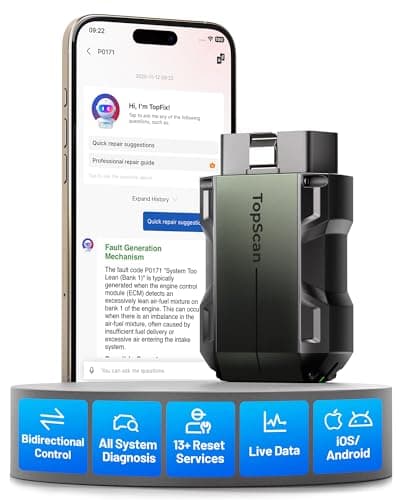
TOPDON TopScan Pro, Amazon product photo
TOPDON TopScan ProBest alternative - adds the capability OBDLink does not claim
Bluetooth to iOS and Android8.6
2
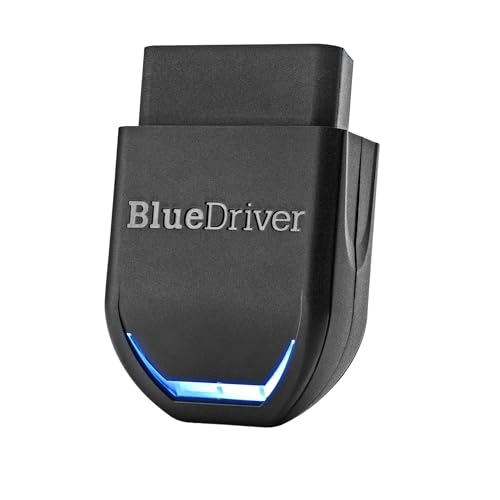
BlueDriver Pro, Amazon product photo
BlueDriver ProBest alternative on enhanced module access
Bluetooth to iOS and Android8.8
3
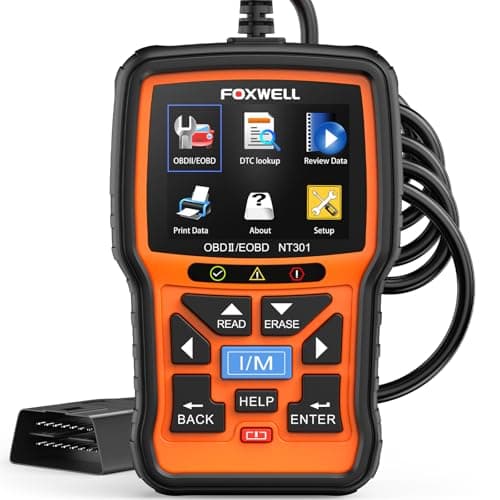
FOXWELL NT301, Amazon product photo
FOXWELL NT301Budget pick - the cheapest alternative that does the job
2.8 in TFT color8.4
4
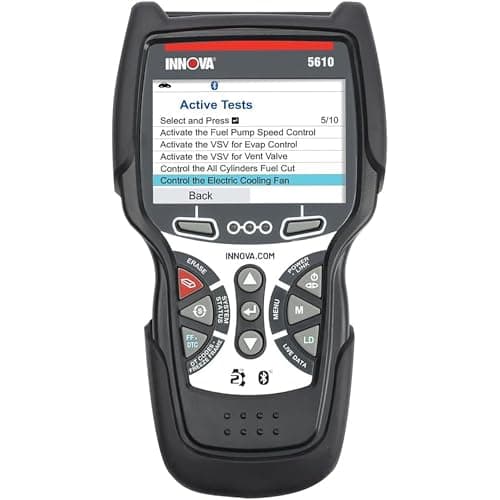
Innova 5610 CarScan Pro, Amazon product photo
Innova 5610 CarScan ProBest alternative if you would rather not use a phone
Engine, transmission, ABS, SRS8.8

Product photographs come from each product's own Amazon listing via the Associates program. They are the seller's images, not photographs of anything we own — we have no test rig and claim none.

TOPDON TopScan Pro, Amazon product photo

Verdict first: the TOPDON TopScan Pro is the best OBDLink alternative for most people - the same dongle-and-app format, for less money, with bi-directional control and 13 service functions that OBDLink does not claim. If what you wanted was enhanced ABS, airbag and transmission access with a written no-subscription promise, the BlueDriver Pro does that for less again. If you would rather have a device with its own screen, the Innova 5610. The budget pick is the FOXWELL NT301. But if you specifically want the data - Ford MS-CAN, GM SW-CAN, 100 samples per second - keep the MX+, because nothing on this page matches it there.

Reason one: you want to command things, not just read them

OBDLink's specification describes reading and reporting - protocols, enhanced parameters, sample rate. It does not claim bi-directional control, the ability to command a component to operate. If that is what you are missing, the TOPDON TopScan Pro publishes it in the same format for less money, and adds 13 maintenance service functions on top. The practical difference shows up in tests you would otherwise do by substitution: cycling a fan to prove a relay, running an ABS pump through a bleed, commanding an injector off to find a dead cylinder. Bi-directional vs basic OBD2 scanners is the honest assessment of how often that matters at home, and best bi-directional OBD2 scanners is the roundup with no price cap.

Reason two: you want to spend less

Be precise about what you give up, because this is where the substitution gets expensive in hindsight. A cheaper handheld like the FOXWELL NT301 publishes generic OBD-II support, live data and freeze frame - which covers the check engine light completely - and publishes no enhanced module access at all. If the reason you were looking at an MX+ was an ABS light, a TPMS fault or a transmission temperature reading, a cheap code reader does not substitute for it at any price.

The middle answer is BlueDriver: enhanced ABS, airbag and transmission access, a published per-make compatibility page, no subscription, for less than the MX+. You lose the two named manufacturer networks and the sample rate. For most owners of most cars that is a trade worth making; for a Ford or GM owner it is not. OBD2 scanner vs code reader draws the line between the two classes of tool.

Reason three: you do not want your phone to be the tool

The MX+ has no screen. Everything it does arrives through a phone app, and for a certain kind of buyer that is a dealbreaker - a flat battery, a locked phone or a borrowed car at the roadside and the tool is useless. Two alternatives here remove that dependency: the Innova 5610, which is a capable self-contained handheld with bi-directional capability and free updates, and the FOXWELL NT301, which is the cheap version of the same idea. Bluetooth vs wired OBD2 scanners weighs the formats properly, and best OBD2 code readers covers the handheld class on its own terms.

OBDLink against the alternatives, on published specifications

Published format, bi-directional capability, enhanced systems, named manufacturer networks and sample rate
ToolFormatBi-directionalEnhanced systemsNamed networks
OBDLink MX+Dongle + phone appNot claimedABS, SRS, TPMS, A/C, trans tempFord MS-CAN, GM SW-CAN
TOPDON TopScan ProDongle + phone appYesFull-system code readingNone - CAN FD and FCA AutoAuth
BlueDriver ProDongle + phone appNot claimedABS, airbag (SRS), transmissionNone published
FOXWELL NT301Handheld, 2.8 inNoNone - generic OBD-II onlyNone published
Innova 5610 CarScan ProHandheldYesEngine, trans, ABS, SRSNone published
Published format, bi-directional capability, enhanced systems, named manufacturer networks and sample rate

Read the last column. One row names two manufacturer networks and one row names a gateway service; the rest name nothing. That column, plus the 100-samples-per-second figure that appears on no other specification here, is the whole of what OBDLink is selling - and the honest summary of this page is that it is not beaten on it.

When the MX+ is still the right buy

Three cases. If your car is a Ford or a GM, the published MS-CAN and SW-CAN support reaches modules a generic dongle cannot, and that is a documented capability rather than a marketing line - best OBD2 scanner for Ford and best OBD2 scanner for GM work through what those networks carry. If the fault is intermittent and you need to log and graph a parameter under load, 100 samples per second is an order of magnitude beyond what a typical dongle streams - best OBD2 scanners for live data ranks the field on exactly that. And if the vehicle was not sold in North America, OBDLink is the only tool we cover publishing EOBD and JOBD variants.

We earn a commission on the MX+ exactly as we do on every alternative listed, so there is nothing in this page for us either way. If data acquisition is genuinely the job, buying a cheaper tool and discovering it streams a fraction as fast is a false economy.

What we would buy

The TOPDON TopScan Pro, if the appeal of the MX+ was a serious tool in dongle form rather than the data rate specifically - it costs less and publishes a capability OBDLink does not claim. The BlueDriver Pro if enhanced ABS, airbag and transmission access with no subscription is the whole requirement. The Innova 5610 if you want a device with its own screen and free updates. The FOXWELL NT301 if the honest job is the check engine light. And the OBDLink MX+ itself if you own a Ford or a GM, chase intermittent faults, or drive a car that was not sold here - in which case nothing on this page is an upgrade.

The picks in full

Every pick, in detail

TOPDON TopScan Pro, Amazon product photo

1. Best alternative - adds the capability OBDLink does not claim

TOPDON TopScan Pro

TOPDON · score 8.6/10

A Bluetooth dongle with bi-directional control, a full-system scan and 13 maintenance services — capability that used to need a tablet.

The same format as the MX+ - a Bluetooth dongle driven by a phone app - with the one capability OBDLink's specification does not claim. TOPDON publishes bi-directional control, full-system code reading, 13 maintenance service functions, and support for CAN FD and FCA AutoAuth, for less than the MX+. If the reason you were looking at OBDLink was "a serious tool that lives in the glovebox" rather than the data rate specifically, this is the better buy. Honest cons: it publishes no sample rate at all, no manufacturer-network names, and its gateway access carries a manufacturer-subscription footnote.

Published specifications

Connection
Bluetooth to iOS and Android TOPDON
Bi-directional
Yes — bi-directional control TOPDON
Diagnostics
Full-system code reading TOPDON
Service functions
13 maintenance services TOPDON
Protocols
CAN FD, FCA AutoAuth

What works

  • Bi-directional control from a dongle that fits in a glovebox
  • Full-system scan list is unusually broad for the format
  • Nothing to carry but your phone

What you give up

  • TOPDON lists bi-directional control and the service functions as subscription features — check what the box includes
  • Depends entirely on the app and your phone
  • Advanced functions are gated by vehicle support

Our scoring

  • Fit & reach8.6
  • Safety margin8.2
  • Beginner ease8.6
  • Build quality8.4
  • Value8.8
$94.99 · View on Amazon

$129.99 27% off

#ad Price as of November 28, 2026. How this is funded

Specifications published by TOPDON — we earn nothing from that link.

BlueDriver Pro, Amazon product photo

2. Best alternative on enhanced module access

BlueDriver Pro

BlueDriver · score 8.8/10

A Bluetooth dongle that reads enhanced ABS, airbag and transmission codes with no subscription, and hands you a repair report instead of a raw code.

The closest match on what most people actually buy an MX+ for: reaching modules past the powertrain. BlueDriver publishes enhanced access to ABS, airbag (SRS) and transmission, coverage of 1996 and newer vehicles sold in North America, Repair Reports built from verified fixes, no subscription of any kind, and a published per-make compatibility page you can check before buying. It costs noticeably less than the MX+. Honest cons: no bi-directional control is claimed, no sample rate is published, and it names no manufacturer-specific networks - so on a Ford or a GM it reaches less than the tool it is replacing.

Published specifications

Connection
Bluetooth to iOS and Android BlueDriver
Coverage
1996 and newer cars, SUVs and light trucks sold in North America BlueDriver
Enhanced systems
ABS, airbag (SRS), transmission BlueDriver
Subscription
None BlueDriver
Reports
Repair Reports built from verified fixes BlueDriver

What works

  • Reads the enhanced ABS and airbag codes most cheap readers cannot
  • Repair reports translate a code into a likely cause
  • No subscription — the price is the price

What you give up

  • Useless if your phone is dead
  • Enhanced coverage depends on the make
  • No bi-directional actuator control

Our scoring

  • Fit & reach8.8
  • Safety margin8.4
  • Beginner ease9.4
  • Build quality8.6
  • Value8.8
$67.99 · View on Amazon

$94.95 28% off

#ad Price as of November 28, 2026. How this is funded

Specifications published by BlueDriver — we earn nothing from that link.

FOXWELL NT301, Amazon product photo

3. Budget pick - the cheapest alternative that does the job

FOXWELL NT301

FOXWELL · score 8.4/10

A 2.8 in color screen that graphs live sensor data and flags emissions readiness with colored LEDs — a diagnostic step up from a bare code reader.

The cheapest tool here that does the job, named as such, and the honest answer if what you need is to read and clear a light rather than log a datastream. FOXWELL publishes a 2.8 in TFT color screen, CAN OBDII / EOBD support, live data in both text and graph form, freeze frame capture, and readiness LEDs with a speaker. No phone, no app, no account. Honest cons: generic OBD-II only - no enhanced modules, no manufacturer networks, no actuation - and the small screen makes a live data graph hard work. It is not an MX+ substitute; it is the tool for the simpler job.

Published specifications

Display
2.8 in TFT color FOXWELL
Standards
CAN OBDII / EOBD FOXWELL
Live data
Text and graph FOXWELL
Freeze frame
Yes FOXWELL
Indicators
Red / yellow / green LEDs plus speaker FOXWELL

What works

  • Graphs live sensor data, which is how you catch an intermittent fault
  • I/M readiness hot key and LED status — glanceable
  • Saves test results for review away from the car

What you give up

  • FOXWELL does not publish ABS or SRS coverage for this model — treat it as engine and emissions only
  • Corded, so you work at the dash
  • Updates require a computer

Our scoring

  • Fit & reach7.6
  • Safety margin8.0
  • Beginner ease9.0
  • Build quality8.2
  • Value9.2
$53.15 · View on Amazon

$69.99 24% off

#ad Price as of November 28, 2026. How this is funded

Specifications published by FOXWELL — we earn nothing from that link.

Innova 5610 CarScan Pro, Amazon product photo

4. Best alternative if you would rather not use a phone

Innova 5610 CarScan Pro

Innova · score 8.8/10

All-system diagnostics with bi-directional control and live ABS, SRS and transmission data — and Innova states updates are free with no subscription.

The MX+ is a dongle with no screen of its own, and for some buyers that is the problem rather than the appeal. Innova publishes a self-contained handheld covering engine, transmission, ABS and SRS, with bi-directional capability, live data including transmission temperature and TPMS, and free updates with no subscription. It matches the MX+ on transmission temperature, beats it on actuation, and removes the phone from the equation. Honest cons: it costs considerably more, Innova publishes coverage for the US and Canada only, and it names no manufacturer networks.

Published specifications

Systems
Engine, transmission, ABS, SRS Innova
Bi-directional
Yes Innova
Live data
Engine, ABS, SRS, transmission (incl. temperature), TPMS Innova
Updates
Free, no subscription Innova
Coverage
OBD2 vehicles 1996+; US and Canada only Innova

What works

  • Bi-directional control without a subscription
  • Transmission fluid temperature readout, which many fluid changes require
  • Free updates keep the tool useful for years

What you give up

  • Innova states it works only in the US and Canada
  • More menus than a beginner needs on day one
  • Corded handheld, not a tablet

Our scoring

  • Fit & reach9.0
  • Safety margin8.6
  • Beginner ease8.2
  • Build quality8.6
  • Value9.0
$255.52 · View on Amazon

$349.99 27% off

#ad Price as of November 28, 2026. How this is funded

Specifications published by Innova — we earn nothing from that link.

Method

How these picks were chosen

We did not test these tools. We do not run a laboratory, we have not loaded a jack to failure or checked a wrench on a calibration bench, and we will not tell you otherwise. What we did instead is read the published manufacturer specifications, check the figures that matter against the safety standard that applies to portable automotive lifting equipment, and work out which tool suits which job. Every number on this page links to where it came from, so you can check us.

The five things we score are the five that decide a first purchase: will it fit under and lift your car, how much safety margin the rating and the locking mechanism leave you, how hard it is to get right alone in a driveway, what the materials and published standards say about how long it lasts, and what the money buys against the rest of the field.

Read the full method — including how we pick a top pick, and how prices get on the page.

Questions

Frequently asked questions

+What is a good alternative to the OBDLink MX+?

The TOPDON TopScan Pro: the same Bluetooth dongle format, for less money, and it publishes bi-directional control and 13 maintenance service functions that OBDLink's specification does not claim. For enhanced ABS and airbag access without a subscription, the BlueDriver Pro.

+Is there a cheaper scanner with the same data rate as OBDLink?

Not among the tools we cover. OBDLink publishes up to 100 samples per second, and no other maker in our registry publishes a sample-rate figure at all. If logging a parameter under load is the job, that is the specification you are buying.

+Is the OBDLink MX+ bi-directional?

OBDLink's published specification describes protocol support, enhanced parameters and sample rate; it does not claim bi-directional control. If commanding components matters to you, that is the main reason to look elsewhere.

+Do I need Ford MS-CAN or GM SW-CAN support?

Only if you own a Ford or a GM. Those are manufacturer-specific networks carrying modules outside the legislated OBD-II set, and OBDLink is the only tool we cover that names them. On any other make it is capability you are paying for and cannot use.

Sources

Where these figures come from

Read next

Related reading